Gaming Computers
- Apr 26, 2022
- 7 min read
Updated: Jul 23, 2022
Introduction
With COVID in 2020, my family has not been able to travel. So I turned to activity and interests that I can do at home. I always enjoyed gaming. I used to game on PC years ago: Doom, Age of Empire, World of Warcraft, etc. Around 10 years ago, when my kid was born, I stopped gaming on PC. Main reason was that PC games typically take up much more dedicated time. And a baby needs to be fed, or diaper needs changing at any time. I started to game on iPad, because games are shorter and I can drop my game to focus on real life tasks. And for computer, I also switched from PC to Mac back in 2013.
Now that my kid is older now, I can allocate more time to gaming again. I was struggling to play World of Warship on my MacBook Pro. Due to both weak hardware (lack of dedicated graphics) and software support. In April 2021, I decided to buy a gaming PC. Then in March 2022, my kid wanted PC also for gaming. So I passed on my PC to my kid. And that is excuse to buy a new PC for myself.
What is gaming PC? As a person that focused on value, gaming PC can be any computer that I can play games with. Most important is having graphics cards that can run the game at medium to high quality and being able to output at least 60 fps. To me, this is bare minimum. And of course want to have decent CPU and enough memory that they are not bottlenecks.
Graphics Card Market Pricing
Since 2020, there has being a lack of computer components availability, particularly graphics card. At beginning of COVID, manufacturers scaled back their production thinking that COVID will cause global economic slow-down. But what happened to me is same as others. Many are stuck at home and consumers are looking for want computers and electronics to enhance their home life. So in 2020, demand for semiconductor (IC chip) sky rocketed and manufacturers cannot get enough ICs to make their parts.
Sometime in 2021, the semiconductor output more-or-less caught up. Now another issue came up. That is crypto currency mining (such as for Ethereum) using GPU was in high demand due to crypto currency pricing. Mining (amount of money made) scales with GPU. As result, graphics card prices skyrocketed.
In the past, I would do my own PC build. However, in last couple years, building your own system is not cost effective. The cheapest way to get a computer and in timely fashion is to buy pre-build systems. These computer manufacturers, either Original Equipment Manufacturer (OEM) or System Integrators (SI) can buy components in bulk. They can build systems that are much cheaper than what I can build myself (particularly due to the graphics card inflated pricing). And these pre-build systems are ready to ship, so you can expect to get the unit in <1 week. Even doing custom build is out of the question. If you want to customize some components on the build, the lead time is ridiculous (> 1.5 to 2 months).
How to Determine Your Needs?
Every couple hundred dollars, you can move up or down in next tier in GPU and/or CPU. So the question is what tier you need, what price you are willing to spend, and what components you need to focus on. For gaming, it is quite simple as there are benchmarks that will help you check the performance.
Resolution and Frame Per Second (fps): First off, what monitor do you plan to use? Will you be using 1080p (HD), 1440p (QHD), or 2160p (4K)? That is vertical resolution (number of pixels in y direction) of your display. Secondly, what frame per second (fps) or frequency (Hz) do you need. There are gaming monitors that go up to 120, 144, 240 fps/Hz. Then type of games also matter. If you are playing a first person shooter or first person perspective game, then you want to have high fps/Hz, so as you turn, the entire frame will appear smoother. On other hand, if you play games like League of Legend, where the background is stationary, fps is not is not as important and 60 Hz will be sufficient.
Use websites that will provide estimates on fps based on hardware. Couple example sites are:
Just be aware that fps data shown might be average. You want to give yourself a bit more room. As scenes get demanding, frame rate will drop. For instance, 80 fps might mean 60 minimum. Also, you want your computer to be playable for the next 2-3 years. So aim for fps that will at least 50% higher than what you need. Of course more is better, but then you will also have to pay the premium for higher performing card.
For instance, using nVidia GeForce RTX 3060 mid-range graphics card + Intel i5 11th Gen CPU, howmanyfps.com estimates the following fps:
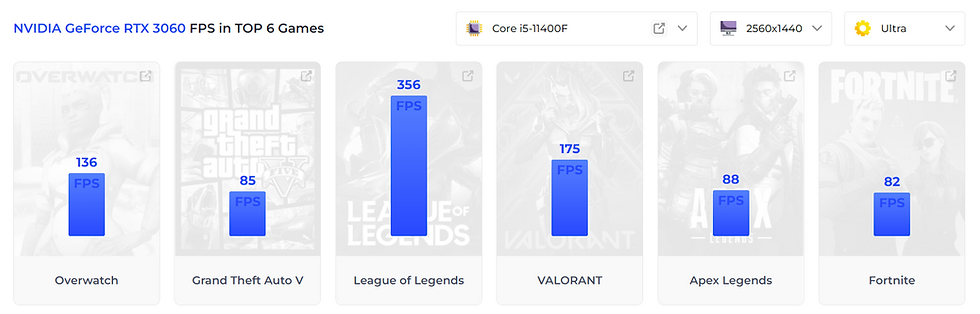
Then similarly, iBuyPower.com provides the fps estimates for this build:


For memory, 8GB is bare minimum that you need to have. I would suggest getting 16GB. This will allow you to run games and run most apps. You don't need 32GB unless you plan to do video editing.
For SSD storage, this depends on your usage. For me, 1TB is barely sufficient. Most games take 50-150 GB for installation. Let's say average is 75 GB. 10 games will be 750GB used. Plus Windows and Apps, this will easily fill up 1TB drive. And I also have a lot of Photos, Videos, and Music (1 to 1.5 TB). So I put these on separate HDD, which is a spinning magnetic hard drive that is much cheaper (but also slower) than solid state drive (SSD).
Comparing Components and Builds
After you have target GPU and CPU you want, there are so many options available, that you will likely need to do some quick comparison as you are shopping. For GPU, how do nVidia last gen (20 series) vs current gen (30 series) compare? And how about AMD Ryzen GPUs? For CPU, there is Intel i5, i7, i9 last gen (11th gen) vs current gen (12th gen)? And AMD CPUs Ryzen 3, 5, 7 series?
Use this website to check for comparisons:
You can compare GPUs directly. For instance, how does mid-range nVidia GPU from last generation (let's say RTX 2060S) compare with lower mid-range GPU from latest generation (RTX 3060):
You can compare CPUs directly. For instance, how does Intel i7 12 gen compare with Ryzen 7 series 5800X:
Another comparison that I find useful is how to compare CPU vs GPU. Let's say I want to add $120 to my build, do I go for CPU or GPU. For example, below is comparison of Intel i7-12700F + RTX 3050 (better CPU but worse GPU) vs Intel i5-12600F + RTX 3060 (worse CPU but better GPU). To make this comparsion, you do have to fill out SSD and RAM. If you don't have any specific brand/model in mind, just pick something in the mid-range and set same for both:
In this particular comparsion, money spend on GPU in better return than CPU. Significant increase in gaming performance with minimal desktop performance reduction. Not surprising as GPU has bigger impact on gaming.

Where to Shop?
I find the best value or best places to shop are:
OEM: HP and Dell
SI: CyberPower PC, iBuyPower, SkyTech, ABS (newegg)
Retailer: Amazon, BestBuy
For OEM, I see HP having the lowest prices. But just be aware that lowest prices often mean skimping on specs. And the issue with OEM is that they use customized components (motherboard size, case size, power supply) that you cannot swap with a generic component.
For SI, CyberPowerPC and iBuyPower offer entry-level computers (sub-$1000) to mid-range computers ($1000-$2000), to high-end computers (more than $2000). I like this, because it provides me with options. On the other hand, there are other gaming PC sellers that focus on higher-end. They might have better components and specs for hardcore gamers, but that is not for me.
OEM vs SI: If you like to tinker and upgrade, best to go with SI for compatibility and upgradeability. If you are the type who is not comfortable opening up computer and plan to use the computer as built, going with OEM can save you money. You can save $100-$150 (which is 10-15% for a $1000-$1200 computer). This savings is significant. Just be aware of the limitations.
For retailer, Amazon has very competitive prices. And they sell pre-build systems from both OEMs and SIs. BestBuy is a good reference to double check prices, but it is mostly out of stock for many of the models that I'm interested.
Best price just depends on just depends availiability, sales or special offers, either at the manufacturers' website or on Amazon. So I find that spending an hour comparing prices help me narrow down and can save $100-$200.
CyberPower PC (April 2021)
I bought this computer last year. It is entry level with a decent graphics card for gaming.
CPU: Intel i7-9700F
GPU: nVidia RTX 1660 Super 6GB
Memory: 16GB DDR-3000MHz (2x8GB)
Storage: 512GB SSD
Price: $1000+tax.
I created a YouTube video on the details of the system:
iBuyPower (March 2022)
When I was shopping for this computer, I changed my mind several times. At first I was going to buy a cheaper build and give it to my kid. So I was looking at HP with RTX 1660 Super for $800+tax. Then I decided to get something better, and I will use the new computer and give my old one to my kid. So this is an excuse to upgrade. I was looking at computer on Amazon for i5-11400F with RTX 2060, for $1100+tax. But similar builds are only available with 512GB SSD storage. I know I use a lot of storage. I want to get 1GB SSD storage. I rather not use the 2nd SSD slot now. I want to keep that future to add 2GB SSD when the prices comes down.
The difficulty with the pre-builds is either lack of customization option (like on Amazon), or any customization at SI pushes out the delivery dates by 6-8 weeks. Then I saw this build at iBuyPower. It has better CPU/GPU and with increased SSD, for $200 more. So I ended up buying this.
CPU: Intel i7-12700F
GPU: nVidia RTX 3060 12GB
Memory: 16GB DDR-3200MHz (2x8GB)
Storage: 1TB SSD
Price: $1300+tax.
In this video, I compared iBuyPower vs CyberPower PC build:


Comments